Cut Post-Meeting Busywork with AI
How it works and what to look for
AI creates meeting notes from audio automatically. Works with Zoom and Teams, with free tiers. Compare tools and learn how Sumarii delivers speaker diarization and accurate Japanese transcription.

Introduction: Let AI take the pain out of meeting notes
Meetings and calls happen every day. After each one, how much time do you spend on “writing up the minutes”?
Summarizing from handwritten notes or fuzzy memory, or replaying a recording over and over to transcribe it, is tedious work. You want to move on to the next task, yet note-taking alone can eat up a large block of time. For small teams and solo operators with limited resources, that lost time hurts.
In recent years, “AI meeting notes” tools have gained attention as a way to solve this problem. By using AI to generate minutes automatically, you can streamline everything from transcription to summarization.
This article explains how AI meeting notes work and what to look for when choosing a tool. We also introduce Sumarii, a Japanese-focused service you can start using for free. If you want to spend less time on minutes and more on real work, read on.
What are AI meeting notes?
AI meeting notes are tools that use artificial intelligence to automatically turn meeting audio into written minutes. They combine two core technologies: speech recognition (audio to text) and natural language processing (understanding meaning, summarizing, and organizing content).
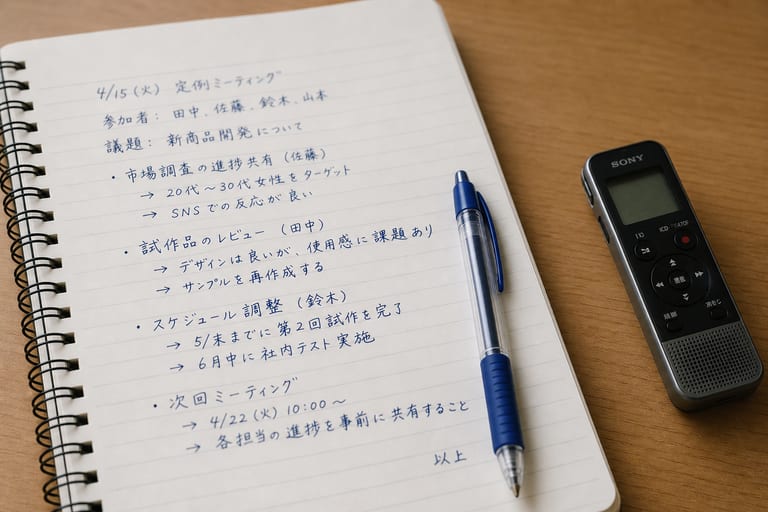
With manual note-taking, transcribing a one-hour recording often takes several times the length of the meeting. You rewind unclear sections and figure out who said what. Turning that into readable minutes takes even more effort.
AI meeting notes change that. Upload or record meeting audio and the tool produces accurate transcription in a fraction of the time, then summarizes key points automatically. Compared with doing it by hand, you can cut note creation time sharply and boost productivity.
Three steps to automatic meeting notes with AI
The workflow is surprisingly simple. Details vary by product, but most tools follow these three steps.
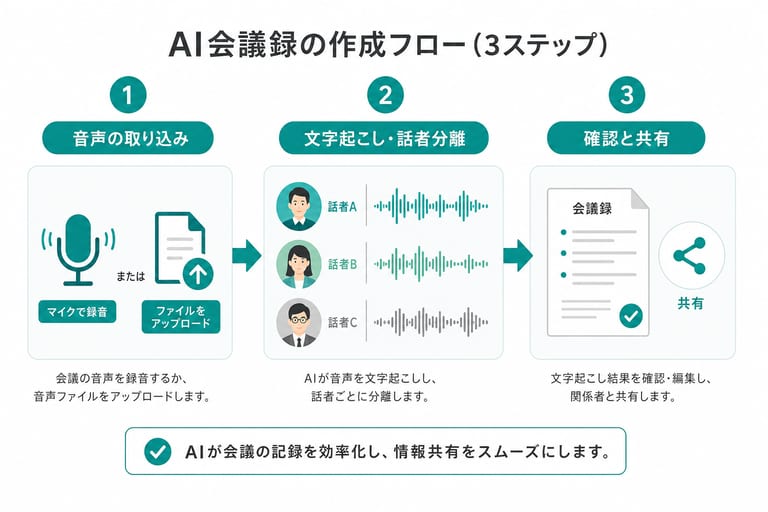
Step 1: Capture audio
First, bring audio into the tool. Most products let you record directly on your phone or computer, or upload files from a recorder (mp3, m4a, and similar formats).
Step 2: AI transcribes and separates speakers
Once audio is loaded, the AI analyzes it. Beyond turning speech into text, speaker diarization identifies who is talking, so lines are labeled by participant. When you read the transcript later, you can see whose opinion each line was.
Step 3: Review the summary and share
After transcription, the AI reads context and summarizes decisions and key points, often as bullet lists. You review the summary and transcript, fix typos, add notes if needed, and export or share the finished minutes with your team.
What to look for in an AI meeting notes tool
Many tools exist worldwide, but they are not interchangeable. Compare these six points to find one that fits your workflow.
- Japanese accuracy
For business use in Japan, Japanese recognition quality matters most. Some global tools excel in English but stumble on homophones, keigo, and industry terms. Prefer tools built or tuned for Japanese. - Speaker diarization quality
In multi-person meetings, who said what often matters as much as what was said. Check whether the tool splits text by speaker and how reliable that is. - Summary features
Look beyond raw transcription. Templates for standups, sales calls, interviews, and other formats make output usable with less editing. - Search across past meetings
Some tools let you search all stored minutes by keyword; others do not. Worth confirming if you need a searchable archive. - Security
Meetings often contain sensitive information. Check whether uploads are used for model training, and whether data is encrypted in transit and at rest. - Free tier
If you are trying AI meeting notes for the first time, a generous free plan or trial lowers the risk of adoption.
Sumarii: Japanese-focused AI meeting notes we recommend
If you are evaluating options, consider Sumarii, an AI transcription, meeting notes, and summarization service built for Japanese.
Sumarii is designed for business users in Japan, with features that make day-to-day work easier. Here are the main benefits.
High Japanese accuracy and flexible input
Sumarii is developed with Japanese business conversations in mind, so transcription feels natural in meetings and sales calls. You can capture audio three ways:
- Record: record directly in the browser
- Upload: upload audio files you already have
- Media URL: import audio or video from a public URL
AI summaries and templates
After transcription, AI summarizes the content. Sumarii offers more than 10 templates for meetings, lectures, podcasts, interviews, and more. Pick a template and get clean Markdown with headings and lists. You can edit or regenerate summaries afterward.
Speaker diarization and timestamps
Transcripts include speaker diarization. Word-level timestamps sync with playback, highlighting the current line so you can jump to any moment without scrubbing the whole recording.
Notes, insights, and AI chat
Sumarii goes beyond transcription.
- Notes: jot private notes in real time while recording.
- Insights: see speaking time and pace to reflect on how the conversation flowed.
- AI chat: ask questions about the session, such as “Who said what about this topic?”, without rereading the full transcript (search is limited to the current session).
Security
Your session content is never used to train AI models. Data is stored primarily on infrastructure in Japan, with encryption in transit and at rest. Suitable for individual and small-team use where confidentiality matters.
AI meeting notes vs. manual work
The table below compares Sumarii, a typical AI meeting notes tool, and manual note-taking.
| Criteria | Sumarii | Typical tools | Manual notes |
|---|---|---|---|
| Japanese accuracy | Built for Japanese; high accuracy | Strong in English; Japanese can feel off | Accurate when done carefully; errors happen |
| Speaker diarization | Automatic | Varies by product | Human listens and types (heavy work) |
| Summaries | 10+ templates by use case | Often basic summaries only | Written from scratch |
| Cross-meeting search | Not yet (per-session AI chat available) | Varies by product | Search files individually |
| Free plan | Yes (~3 hours/month transcription + generous AI quota, no credit card) | Trial only or limited features | No software cost (your time only) |
| Time to produce notes | Much faster than manual | Varies by tool | Often several times meeting length |
Comparisons reflect general trends. Check each vendor’s site for current specifications.
Turning Zoom or Teams meetings into notes
Zoom and Microsoft Teams are common for internal and external calls. Sumarii makes it easy to turn those recordings into minutes.
The process is straightforward.
- Record and save meeting audio with Zoom or Teams.
- After the meeting, drag and drop the audio file into Sumarii.
- AI starts transcription and summarization automatically.
Use this for online sales calls, standups, and any recurring remote meeting.
Get started for free
Sumarii is free to start on the free plan — no credit card required.
Free tier
The Free plan includes roughly 3 hours of transcription per month, plus a comfortable quota for AI summaries and chat. Pro adds 20 hours and a larger AI pool. Try it on real meeting audio to judge accuracy and workflow fit.
Pro is ¥1,980/month or ¥19,800/year (tax included). Team plans are coming soon.
Sign up
Registration takes a few minutes.
- Open the sign-up page at app.sumarii.com.
- Sign in with Google or create an account with email and password.
- After login, your personal workspace is ready for recording and uploads.
Note
Each account gets one personal workspace. Team workspaces are not available yet. To share minutes with others, export as docx, txt, or srt. PDF export is not supported at this time.
Conclusion: Focus on real work with Sumarii
Meeting minutes are important, but they consume time and energy.
With AI meeting notes, three steps (capture audio, let AI transcribe and separate speakers, review the summary) can greatly reduce that burden. Time saved goes back to proposals, planning, and creative work.

Sumarii is Japanese-focused, works across meetings, sales calls, and interviews, and is free to try on the free plan. If you are tired of manual minutes, sign up and see how much faster note-taking can be.

Transcription, meeting notes, and AI summaries in one place.
From recording, file, URL, or meeting-bot invite: summarize, take notes, chat, and export.
- Recording, file, URL, or meeting bot (Zoom / Meet / Teams)
- 10+ templates for meetings, lectures, podcasts, and more
- About 3 hours of free transcription and generous AI usage per month
Start free
Create an account and jump in right away.
No AI training · Stored in Japan · Encrypted