[2026] Top 5 AI Meeting Notes with Speaker Diarization & Search
Struggling to tell who said what, or to find past meetings? We compare five AI meeting notes tools with speaker diarization and cross-meeting search. Seven selection tips, rollout steps, and free options — including tools that turn notes into searchable team knowledge.
![[2026] Top 5 AI Meeting Notes with Speaker Diarization & Search](/images/blog/ai-meeting-minutes-speaker-separation-search/1.jpg)
When you review meetings or hand off work, do you ever wonder who made a given comment, or which meeting a decision came from?
This article compares five AI meeting notes tools that support speaker diarization and cross-meeting search. By the end, you should have a short list that fits your team’s real needs.
Key takeaways
- Speaker diarization and cross-meeting search help keep notes from living in one person’s head and turn them into team assets.
- When choosing a tool, look beyond raw transcription accuracy to search quality and security.
- Sumarii offers accurate speaker diarization and workspace-wide hybrid search on the free plan.
What are AI meeting notes with diarization and search?
These tools automatically tell speakers apart in multi-person audio and let you find past content quickly.
Diarization makes it clear who said what. Cross-meeting search lets you pull up keywords or context across your archive. Together, notes become a searchable knowledge base instead of a pile of text files.
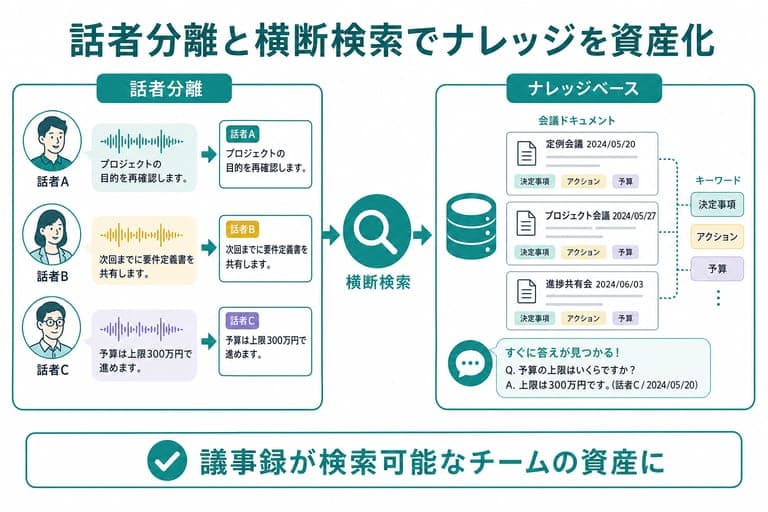 Diarization and search turn meeting notes into reusable team knowledge
Seven tips for choosing the right tool
1. Diarization accuracy and how easy it is to fix mistakes
Accuracy varies a lot between products.
Real meetings often have overlapping speech, so pick a tool with strong separation. Also check whether you can rename or correct speakers quickly after the fact.
2. Search depth: keywords vs. AI chat
To reuse past meetings, search matters as much as transcription.
Keyword search alone is often not enough. Tools with AI chat search (including hybrid search) that understand context are usually more useful. Workspace-wide search makes finding information much faster.
3. Security and whether your data trains models
Meeting audio and text often contain confidential information.
Prefer tools that do not use your content to train AI models. Also confirm where data is stored (e.g. Japan) and that traffic and storage are encrypted.
4. Pricing and free trials
Check whether pricing matches how often you meet.
Most tools are subscription-based, but many offer free tiers or trials. Test on real meeting audio before you commit.
5. Integration with web meetings and chat
Smooth integration with tools you already use saves friction.
Bot features that join Zoom, Google Meet, or Microsoft Teams automatically help prevent forgotten recordings.
6. Languages for transcription and summaries
If you run global meetings, confirm supported languages.
Some tools are tuned for Japanese; others focus on multilingual real-time translation. Match the product to the languages you actually use.
7. Flexible input methods
Different meeting formats need different capture options.
Look for direct recording, file upload, and meeting-bot invite — whatever matches how your team works.
Comparison table: top 5 picks
Five leading tools with speaker diarization and search, side by side.
Pricing and specs reflect public information as of July 2026. Confirm current details on each vendor’s site.
| Tool | Diarization | Cross-meeting search | Chat editing | Security (AI training) | Price (approx. monthly, tax incl.) |
|---|---|---|---|---|---|
| Sumarii | Yes | Yes (hybrid search) | Yes (summary · transcript · translation) | No training · Japan storage | Free (~3 hours) · Pro ¥1,980/mo |
| Notta | Yes | Yes | Q&A only | No training on Enterprise only | From ¥1,185 (annual Premium) |
| Rimo Voice | Yes | Yes (AI search on Pro+) | △ Edit instructions | No training | From ¥1,100 (annual transcription) |
| toruno | Yes | Partial (keyword search on Business, etc.) | × | No training | ¥1,650 (Personal) |
| LINE WORKS AiNote | Yes | Yes | × | No training on paid plans | From ¥1,440 (annual Solo) |
Detailed look at each tool
Sumarii
Sumarii is an AI transcription and meeting-notes service built for Japanese.
It supports speaker diarization with editable speaker names. Workspace-wide AI chat (hybrid search) lets you pull answers from all past meetings in a conversational way. The Free plan includes roughly 3 hours per month; Pro adds 20 hours and a larger AI pool.
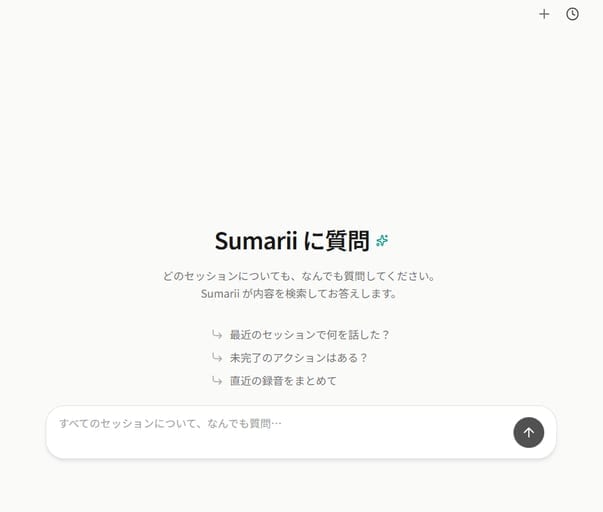 Ask across all past meetings with Sumarii’s AI chat search
- Strengths: Word-level timestamps, low-confidence word highlighting, hybrid search, in-place chat editing
- Weaknesses: Team plans coming soon
- Best for: Teams that want strong Japanese recognition and cross-meeting search
- Pricing: Free (~3 hours/month) · Pro ¥1,980/month (tax incl.)
Notta
Notta is a feature-rich AI transcription tool with a polished interface.
It offers diarization and synced playback across devices. Workspace search helps you find the right minutes quickly.
- Strengths: Multilingual support, strong mobile apps
- Weaknesses: No-training mode is Enterprise-only (contact sales)
- Best for: Multilingual meetings and heavy mobile use
- Pricing: Premium from ¥1,185/month (annual billing) · free tier available
Rimo Voice
Rimo Voice focuses on Japanese speech recognition.
Diarization labels who spoke automatically. On Pro and above, “AI search” lets you query stored minutes via chat.
- Strengths: Intuitive UI, slider playback, AI search
- Weaknesses: AI search and advanced summaries need higher tiers
- Best for: Users who want simple operation and readable transcripts
- Pricing: Transcription plan from ¥1,100/month (annual billing)
toruno
toruno records meetings while capturing screen content alongside audio.
Diarization makes review easier. Cross-meeting search is mainly keyword search from lists on Business plans and similar tiers.
- Strengths: Screen capture, easy recording via Windows app
- Weaknesses: No advanced AI chat search across all minutes
- Best for: Teams that want slides and shared screens recorded with audio
- Pricing: Personal plan ¥1,650/month · free tier available
LINE WORKS AiNote
LINE WORKS AiNote is an AI speech tool integrated with LINE WORKS.
It includes diarization and cross-meeting search. Paid plans do not use your data for model training.
- Strengths: Tight LINE WORKS integration, admin features for organizations
- Weaknesses: Limited value if you do not use LINE WORKS
- Best for: Companies already on LINE WORKS
- Pricing: Solo from ¥1,440/month (annual billing) · free tier available
Common rollout mistakes
Mistake 1: Weak search — you still hunt through files
Some teams adopt keyword-only search and still cannot find “the meeting where we talked about that issue.” They end up opening files one by one. Hybrid AI chat search avoids this.
Mistake 2: Poor diarization — endless speaker cleanup
Diarization exists on paper, but overlapping voices swap “Speaker 1” and “Speaker 2” constantly. Fixing labels eats the time you hoped to save. Always test on real meeting audio during a free trial.
Mistake 3: Free tier trains on confidential data
To save money, a team picks a free product whose terms allow training on uploaded content — exposing internal information. Check security requirements upfront and choose no-training options (such as Sumarii) when confidentiality matters.
Three steps to roll out AI meeting notes
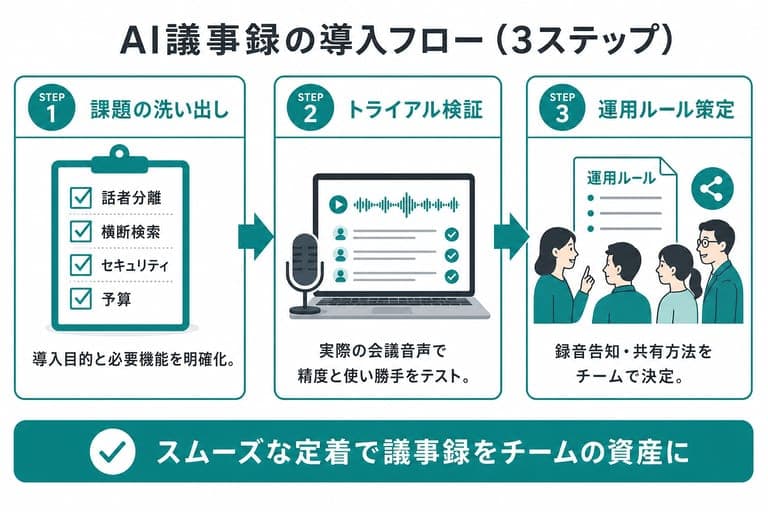 Define requirements, validate on real meetings, then set team rules
Step 1: Define the problem and requirements
Clarify goals: “Cut note-taking time,” “Make past decisions searchable,” and so on. List must-have features (diarization, search, languages) and budget.
Step 2: Validate accuracy on a free trial
Shortlist two or three tools and run them on real meetings. Check domain vocabulary, diarization quality, and whether search feels natural.
Step 3: Set team operating rules
Once you pick a tool, agree on which meetings use it, how you announce recording, and where minutes live and how they are shared. Clear rules help adoption stick.
Summary
Tools with speaker diarization and cross-meeting search turn meeting records into searchable team knowledge.
Compare diarization quality, search, security, and price together — not transcription alone. Start with free trials and see what fits your workflow.
Sumarii combines strong Japanese transcription with hybrid search and is free to try on the free plan.
FAQ
What is speaker diarization in AI meeting notes?
It analyzes meeting audio and labels who said what automatically, which makes minutes much easier to read.
Can I find a specific topic across past meetings?
Yes, with tools that support cross-meeting search. Sumarii’s AI chat, for example, can answer from across your workspace with context.
Is meeting audio used to train AI models?
It depends on the tool and plan. Sumarii does not use your audio or transcripts for model training, so confidential meetings are safer.
How is this different from built-in Zoom or Teams transcription?
Built-in features often stop at live captions. Dedicated AI meeting notes tools add stronger diarization, richer summaries, and search across your meeting archive.
Can I try before buying?
Most vendors offer free tiers or trials. Sumarii’s Free plan includes roughly 3 hours of transcription and AI features per month at no charge; Pro is ¥1,980/month (tax included).

Transcription, meeting notes, and AI summaries in one place.
From recording, file, URL, or meeting-bot invite: summarize, take notes, chat, and export.
- Recording, file, URL, or meeting bot (Zoom / Meet / Teams)
- 10+ templates for meetings, lectures, podcasts, and more
- About 3 hours of free transcription and generous AI usage per month
Start free
Create an account and jump in right away.
No AI training · Stored in Japan · Encrypted