What is Sumarii?
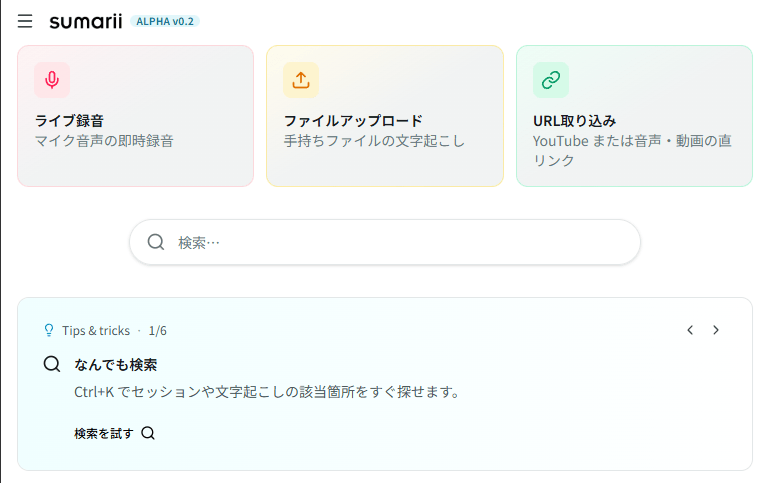
Transcription, AI summary, insights, and AI chat from recording, file upload, or URL. About 3 hours of free transcription every month on the free plan.
After a lecture, podcast, call, or meeting, someone still has to turn the recording into something readable. That work usually falls on a person, even when you already have a transcript.
Transcription is not the deliverable
Most tools stop at speech-to-text. That step matters, but it is not what you share or reuse.
A useful output needs structure that matches the content: key points for a lecture, highlights for a podcast, decisions for a team call, pull quotes for an interview. Different inputs need different templates and different things extracted.
Sumarii is built around that structured output, not a wall of raw text.
What Sumarii does
One session, five views (from mic recording, file upload, or media URL):
- Transcript: Speaker diarization, word-level timestamps, playback sync, inline review of low-confidence words
- Summary: AI summarizes the transcript into templated markdown (meetings, lectures, podcasts, interviews, and more). Edit inline or regenerate
- Notes: Personal notes in a separate tab, even while recording
- Insights: Talk time and pace computed in the browser
- Chat: AI chat grounded in the session to ask what was said or refine the summary
Transcription is infrastructure. The product is recording → transcript → summary and notes you can edit and export.
Who it is for today
Anyone working with spoken audio or video:
- Students and teachers turning lectures into study notes
- Podcasters and creators who want show notes or episode summaries
- Teams that need structured notes from calls and workshops
- Researchers and journalists reviewing interviews
We are early. One account gets one personal workspace. Shared team workspaces are not available yet.
What you can use now
- Browser app at app.sumarii.com
- Templates for different session types; custom templates in your workspace
- Export docx, txt, srt, and audio (PDF not available yet)
- Sign in with Google or email and password
Free plan
Create an account and use generous free limits on the free plan, including about 3 hours of transcription per month and generous AI for summaries, chat, and translation — no credit card required.
We read feedback and bug reports. If something breaks or feels wrong, use the help form on the site.
Details: pricing page.
Pricing
Free includes about 3 hours of transcription and generous AI per month — no credit card. Pro is ¥1,980/month or ¥19,800/year (tax included) for 20 hours of transcription and a larger AI pool. Upgrade anytime in the app under Settings → Billing. Team plans are coming soon.
Details: pricing page · Questions: contact us
Security
- Meeting and session content is not used to train our models or provider models we use for inference
- Customer data is stored on infrastructure in Japan, in principle
- HTTPS in transit; encrypted at rest
More detail: security & trust · privacy policy.
Try it free. Run one recording and see transcription through to summary and notes.

Transcription, meeting notes, and AI summaries in one place.
From recording, file, URL, or meeting-bot invite: summarize, take notes, chat, and export.
- Recording, file, URL, or meeting bot (Zoom / Meet / Teams)
- 10+ templates for meetings, lectures, podcasts, and more
- About 3 hours of free transcription and generous AI usage per month
Start free
Create an account and jump in right away.
No AI training · Stored in Japan · Encrypted